 Insights
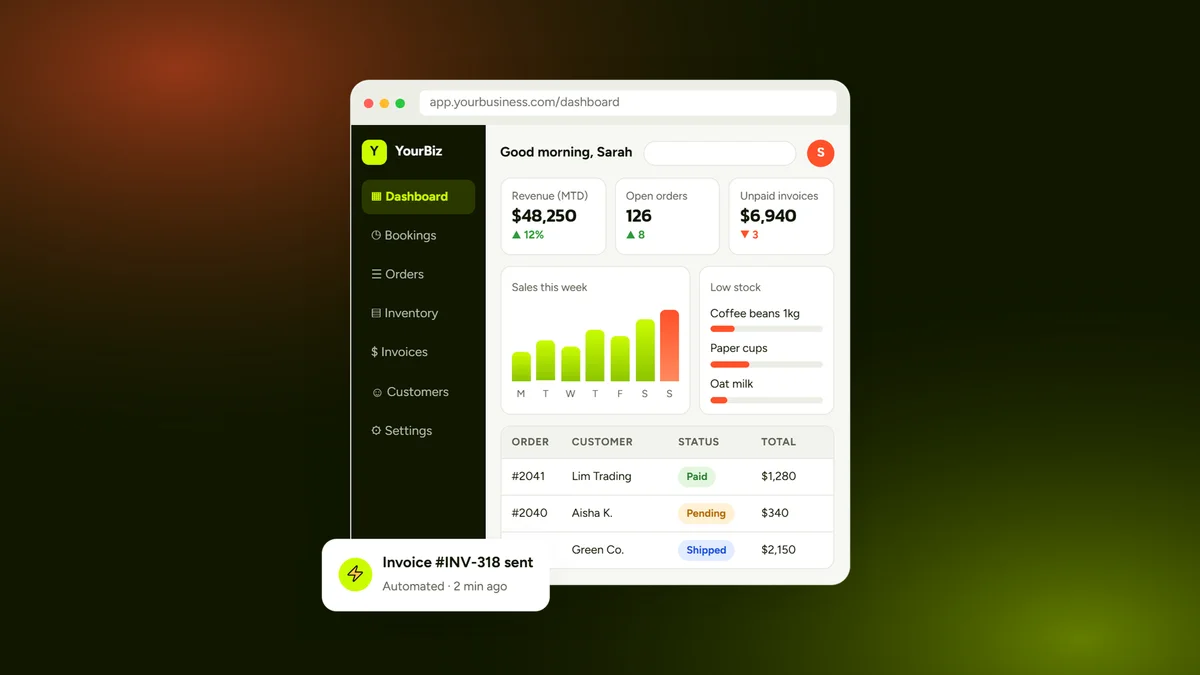
The best custom business dashboard software for small business combines your core metrics—sales, operational workflows, and marketing performance—into a single, real-time interface built specifically around your day-to-day operations. Rather than forcing your team into rigid, multi-tiered subscription apps, the ideal dashboard unifies your existing tools into one clear command center. This approach cuts software bloat, eliminates manual data entry, and gives owners the visibility needed to scale reliably.
Why Off-the-Shelf Analytics Tools Fail Growing Businesses
Most small business owners start by tracking operations through fragmented spreadsheets and standard SaaS platforms. While generic tools work initially, they quickly introduce bottlenecks as your transaction volume and headcount increase.
Pre-packaged dashboards often suffer from critical design and operational limitations:
- Siloed Information: Native apps trap customer histories, sales receipts, and support tickets in independent databases, forcing you to constantly switch tabs to see actual margins.
- Seat-Based Licensing Taxes: Standard SaaS platforms charge steep monthly fees per user, artificially penalizing team collaboration as you hire new staff.
- Feature Overhead: Generic enterprise dashboards require steep learning curves and feature hundreds of unused toggles that clutter your daily view.
- Brittle Third-Party Integrations: Relying on consumer-tier sync connectors often leads to silent sync failures, duplicate records, and broken reporting formulas.
Investing in tailored custom business systems solves this disconnect by mapping metrics directly to your specific fulfillment, sales, and administrative rhythms.
Related: custom business systems

Core Features Every Custom Business Dashboard Must Include
An effective dashboard provides tactical clarity at a glance without unnecessary operational friction. Prioritize functionality that shortens administrative reaction times and simplifies routine tasks.
Real-Time Cross-Channel Data Ingestion
Your system should automatically fetch, clean, and display live records from payment processors, CRM pipelines, and web servers. This eliminates the multi-hour weekly routine of manually exporting CSV files to reconcile numbers.
Role-Based Access Control and Security
Keep sensitive business data safe by controlling who sees what across your operational infrastructure.
- Executive Views: High-level financial reporting, profit margins, overhead overheads, and multi-channel revenue goals.
- Operations Portals: Immediate fulfillment queues, supply chain tracking, and vendor response timelines.
- Marketing Dashboards: Conversion metrics, ad spend velocity, and lead attribution data directly tied to customer acquisitions.
Automated Alerts and Threshold Monitoring
Rather than requiring team members to watch screens all day, modern portals trigger push alerts or SMS updates when critical key performance indicators cross predefined thresholds.
Top Platform Options for Building Small Business Dashboards
When selecting the best custom business dashboard software for small business workflows, companies generally choose between three primary development paths. Each framework offers distinct advantages depending on your technical resources and scaling strategy.
1. Bespoke Web Portals (Tailored Code)
A ground-up portal built on modern web frameworks offers unmatched speed, ironclad data ownership, and zero perpetual user license fees. You design every card, report, and automation trigger precisely around your internal processes.
2. Low-Code Enterprise Engines
Platforms like Retool and Appsmith let internal technical teams construct visual interfaces over existing SQL databases and third-party APIs. They accelerate initial deployment but still require technical maintenance and persistent hosting management.
3. Commercial BI Platforms
Tools like Power BI and Looker Studio handle extensive analytical computation over vast historical archives. However, they lack bi-directional editing capabilities, meaning you cannot update operational statuses, dispatch orders, or edit client accounts directly within the dashboard screen.
For owners seeking a comprehensive breakdown of build requirements and budget trade-offs, our custom business system software guide outlines how to evaluate architecture against your operational overhead.
Related: custom business system software guide

Connecting Marketing Performance to Bottom-Line Operations
A dashboard should never stop at recording inventory or invoicing. To scale predictably, leadership must see how digital advertising investments translate directly into gross sales and completed service bookings.
Integrating your active outreach channels directly into your operational engine unlocks decisive business insights:
- True Customer Acquisition Cost: Measure media spend directly against cleared invoices rather than preliminary lead form submissions.
- Campaign Efficiency: Review campaign returns from targeted Google Ads initiatives beside operational delivery capacity to avoid overbooking your crew.
- Pipeline Velocity: Identify exactly where qualified prospects encounter friction between the initial ad click and the final contract signing.
Consolidating these pipelines reveals operational bottlenecks early, allowing you to reallocate ad spend toward your highest-margin products without guessing.
Related: Google Ads
How Custom Dashboards Deliver Measurable Long-Term ROI
Deploying a purpose-built business system turns opaque daily operations into clear, repeatable metrics. By consolidating disconnected tools, businesses eliminate thousands of dollars in fragmented SaaS subscriptions while recovering dozens of administrative hours each week.
Instead of wrestling with incompatible platforms, your team works from a single source of operational truth. Faster customer fulfillment, immediate visibility into your margins, and confident executive decision-making directly drive bottom-line expansion.
If you are ready to replace manual tracking sheets and disconnected apps with an intuitive, unified system, explore our flexible pricing models or contact our development team to turn your operational vision into a high-performance business portal.
Related: pricing
Frequently Asked Questions
What is custom business dashboard software?
Custom business dashboard software is a tailored digital portal that unifies real-time operational data, financial metrics, and customer insights from multiple business tools into a single, cohesive interface.
How much does a custom business dashboard cost for a small business?
A custom small business dashboard typically ranges from $3,000 to $15,000 depending on integration complexity, data pipelines, user roles, and whether you deploy on a low-code framework or a fully custom web application.
Can a custom dashboard integrate with our existing CRM and accounting tools?
Yes, custom dashboards use secure APIs and webhooks to synchronize bi-directional data across modern CRM platforms, payment processors like Stripe, accounting tools like QuickBooks, and digital marketing accounts.
Why choose custom dashboard software over off-the-shelf business intelligence apps?
Custom dashboards eliminate recurring per-seat licensing fees, display only the metrics relevant to your exact operational model, and allow staff to edit records directly rather than just viewing static historical charts.
How long does it take to develop a custom operational dashboard?
Most small-to-medium businesses can plan, build, and deploy an initial production-ready custom dashboard within 3 to 8 weeks, depending on data cleanliness and the number of connected external tools.
Learn more at webbily.com.